
The most popular advice about an AI stem extractor is also the least reliable: choose the tool with the highest benchmark score and use it for everything. In real audio work, the job comes first. A separator trained to isolate a lead vocal from a dense music mix isn't automatically suited to extracting dialogue from room tone, and a speech model can damage musical transients when asked to produce drums or bass.
Modern source separation has a long technical history. It emerged as a distinct research field in the mid-1990s, expanded rapidly into the early 2000s, entered the IEEE signal-processing taxonomy in 2006, and split into more specialized categories in 2014, as documented in this historical review of source separation research. Today's systems are more accessible and more capable, but they still inherit the central problem of the field: different sources require different assumptions.
Table of Contents
- Why One AI Stem Extractor Cannot Do Everything
- How AI Stem Extraction Actually Works
- Understanding Quality Metrics and Benchmarks
- Real-World Use Cases Across Creative Workflows
- Speed Versus Quality Tradeoffs in Stem Separation
- Choosing the Right Tool for Your Specific Needs
- Getting Better Results From Any Stem Extractor
Why One AI Stem Extractor Cannot Do Everything
A finished mix doesn't contain neat, labeled files waiting to be recovered. It contains overlapping waveforms, shared frequencies, reverberation, compression, distortion, and masking. Source separation means estimating which parts of that combined signal belong to vocals, drums, bass, speech, effects, ambience, or other desired sources.
That estimation depends heavily on the material used to train and optimize the model. A music separator learns patterns from multitrack songs and typically expects categories such as vocals, drums, bass, and other instruments. A speech model focuses on voice intelligibility, competing speakers, noise, and room sound. A cinematic separator may need to distinguish dialogue, music, and effects, even though the music model might place much of that material into a single “other” stem.
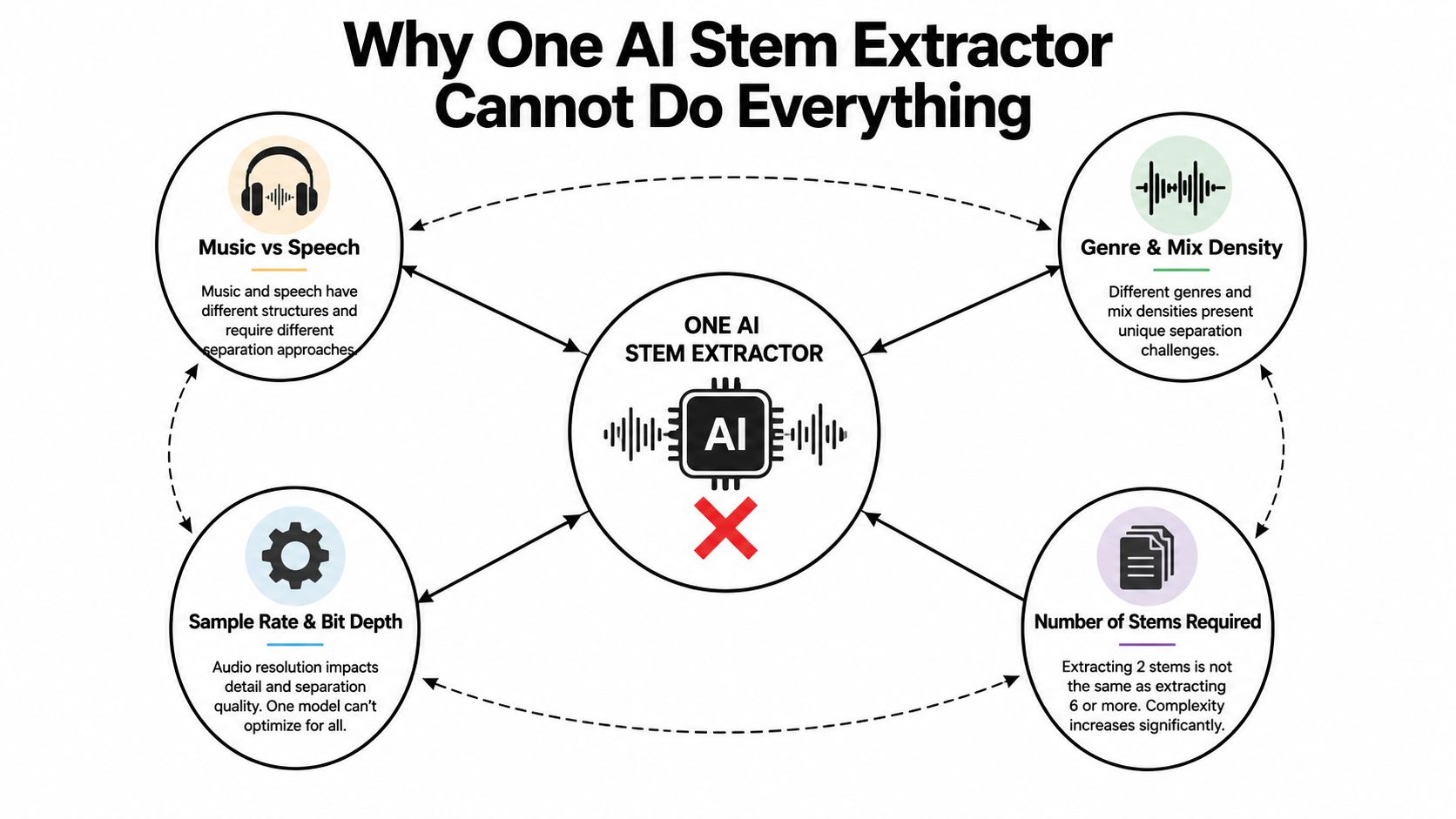
Training objectives shape the result
The contradiction becomes obvious in film post-production. A music workflow usually wants instruments separated. A cinematic workflow may want a complete music bed kept together while dialogue and sound effects are isolated around it. A model that treats instruments as independent targets can produce a result that's technically separated but editorially useless for the actual task.
A 2025 MERL paper on task-aware source separation describes this conflict directly. It notes that a single model struggles across speech enhancement, speech separation, music source separation, and cinematic audio source separation because the tasks can require contradictory grouping decisions. Its proposed answer is task-aware prompting, rather than assuming a universal output structure. Read the research on task-aware audio source separation for the underlying approach.
Practical rule: Define the source you need to preserve before comparing tools. “Separate this audio” isn't a sufficient specification.
Genre and arrangement matter just as much. Sparse acoustic material gives a model more room to identify individual sources. Dense electronic production, heavy reverb, distorted guitars, layered backing vocals, and cymbals sharing high-frequency energy create harder boundaries. A vocal extractor may sound convincing in the chorus but expose watery consonants and residual cymbal bleed in a busy section.
For that reason, evaluate an extractor against your most common content, not a clean demo track. If your work spans podcasts, songs, and film clips, you may need different task-specific models or processing modes, not one universal button.
How AI Stem Extraction Actually Works
An AI stem extractor begins with a waveform, the time-domain representation of the audio. Most systems transform that signal into a spectrogram, a visual map showing how energy is distributed across frequency and time. The conversion commonly uses a Fourier transform, which breaks complex audio into frequency components that a neural network can analyze.
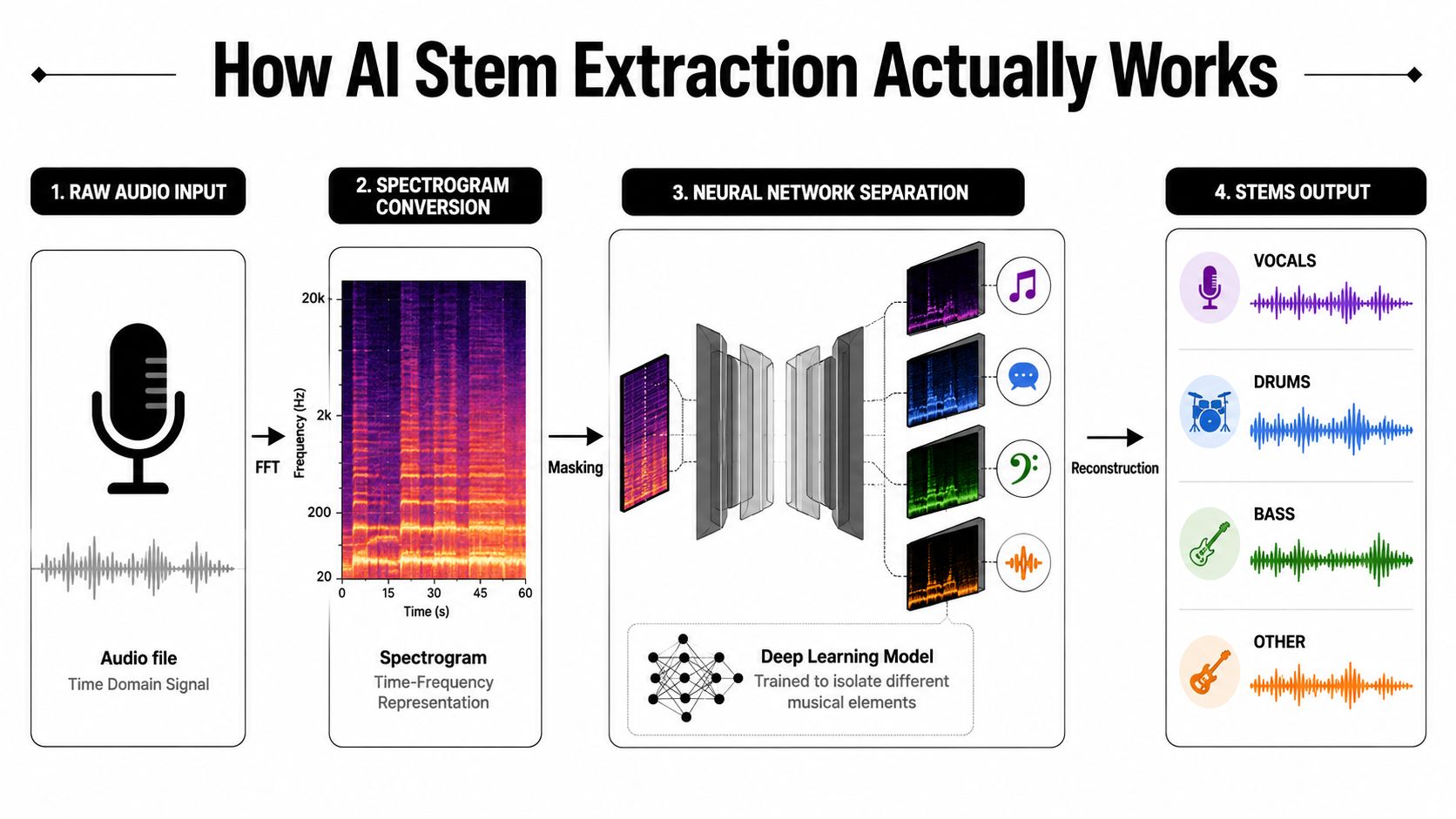
From frequency map to separated source
Think of a spectrogram as a photograph made from overlapping colors. The model tries to estimate which regions belong to the vocal, drums, bass, or another target. It then creates a mask, a set of values that tells the system how strongly to retain or suppress each part of the representation.
A U-Net-style architecture can analyze broad context while preserving detail through skip connections. Transformer-based systems use attention to relate distant regions in the audio, which can help them recognize patterns that don't make sense when examined one small slice at a time. The architecture matters, but the training examples and target definitions matter just as much.
The separator applies a learned mask to the mixture representation. For a vocal output, it retains energy associated with vocal harmonics, consonants, and phrasing while reducing competing instruments. That process isn't a literal extraction of original tracks. It's an informed reconstruction.
Reconstruction is where artifacts become audible
After masking, the system converts the result back into a waveform. This requires phase information, the timing relationship that helps determine how frequency components combine. Poor phase estimation can create smearing, hollow tone, unstable stereo imaging, or a watery character, especially around percussion and consonants.
Some systems operate mainly in the spectrogram domain, while others work directly on the waveform or combine both approaches. Spectrogram masking can provide precise frequency control, whereas time-domain processing can preserve certain transients more naturally. Hybrid systems try to use the strengths of both, but no architecture eliminates the limits of starting with a finished stereo mix.
The output also reflects the target categories. If the model was trained to produce four music stems, it must force ambiguous material into those buckets. A guitar, piano, synth, and backing vocal may share the “other” result, even when the user needs them treated separately.
The embedded demonstration below shows the kind of processing workflow creators commonly associate with modern separation tools.
Use the separated files as estimates, not recovered multitrack originals. That distinction explains why a stem can be useful for editing while still sounding imperfect in solo.
Understanding Quality Metrics and Benchmarks
A benchmark score is useful only if its measurement matches the job. SDR, or Signal-to-Distortion Ratio, summarizes how closely an estimate matches a reference source while accounting for distortion. SIR, or Signal-to-Interference Ratio, measures unwanted content bleeding in from other sources. SAR, or Signal-to-Artifacts Ratio, focuses on artificial material introduced during separation.
Music source-separation research commonly reports all three. One benchmark overview places singing-voice separation on MUSDB18 at about 7.24 dB SDR, while recent papers cluster around 6 to 7 dB SDR. That range offers a practical baseline for comparing newer systems with older open-source approaches, as discussed in this source-separation benchmark discussion.
| Metric | What It Measures | Real-World Limitation |
|---|---|---|
| SDR | Overall distortion in the estimated stem | A strong score can still hide artifacts that listeners find distracting |
| SIR | Leakage from competing sources | Less leakage doesn't guarantee natural tone or preserved musical detail |
| SAR | Artifacts created by the separator | It doesn't fully represent whether a stem works inside a finished edit |
Why public benchmarks don't settle the buying decision
The widely used music benchmark MUSDB18 contains 150 full-length tracks totaling about 10 hours, with professionally produced stereo mixtures and isolated sources. It includes training and test subsets and served as the official professionally produced music-recordings dataset for SiSEC 2018, according to the MUSDB18 dataset description and research history.
That consistency makes MUSDB18 valuable for controlled comparisons. It also makes the dataset narrower than material handled in production. A podcast interview with room echo, a compressed social-media download, a film mix with effects, or an older saturated recording can challenge a separator in ways a polished benchmark track does not.
A reproducible comparison reported Music.AI's proprietary separator with an average SDR 15.8% higher than its nearest competitor across MUSDB18-HQ and an additional proprietary dataset, as described in the reproducible benchmark paper. The result also shows why rankings need context. Dataset selection changes the outcome, while private or difficult material can expose leakage and transient failures that a public test misses.
Perception adds another complication. A 2026 bake-off study found that SDR worked best for vocal estimates, while SI-SAR better predicted listener ratings for drums and bass. Its conclusion was that no single metric consistently represents perceived quality across every stem, as reported in the study of perceptual metrics for separated stems.
Audition the output in context. A vocal stem can sound rough in solo yet fit a remix perfectly. A drum stem can score well while losing the attack that gives a kick its function. Let the intended deliverable, your ears, and a short test with representative material outweigh any leaderboard headline.
Real-World Use Cases Across Creative Workflows
The same input can produce a successful result or a disappointing one depending on what the editor needs to do next. Podcasting, music production, and video post-production don't ask for the same kind of separation, even when they use similar language.
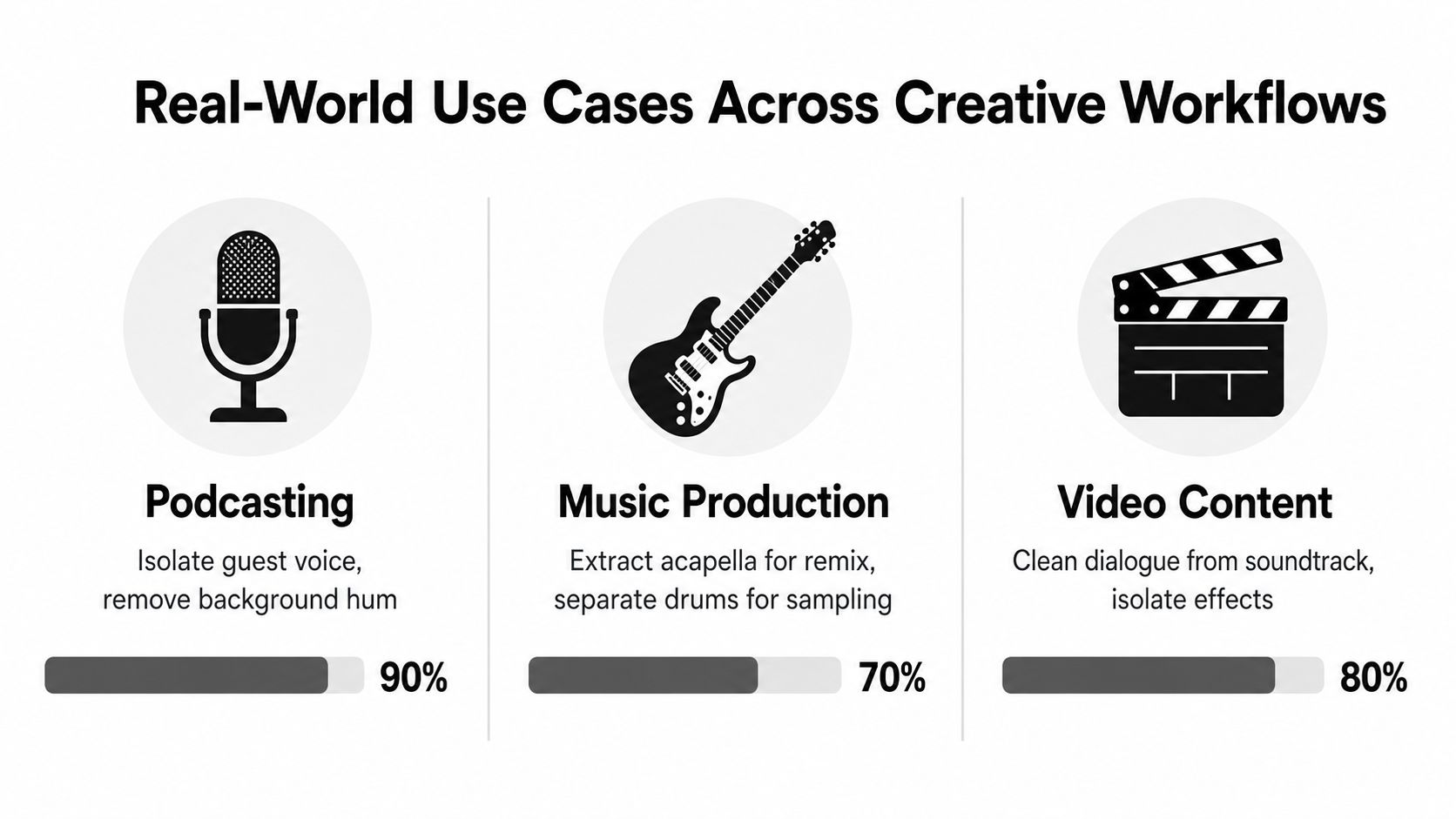
Podcast and speech workflows
A podcast editor usually wants intelligible speech, not a beautifully isolated waveform. The practical target might be one guest's voice with background hum reduced, or dialogue separated from music so the editor can rebalance a video interview.
Speech-focused processing tends to work best when the desired output is clearly defined. Ask for dialogue or speech rather than “vocals,” because a music model may interpret sung voice and spoken voice through the wrong assumptions. In field recordings, listen for clipped consonants, metallic room tone, and unnatural gaps between words.
A creator producing narration for a faceless video may also need a clean bed underneath the voice. Tools for generating an original soundtrack, such as create AI soundtrack for faceless videos, can be useful when replacement music is more appropriate than trying to recover a damaged original bed.
Music production scenarios
Producers use separation for remix preparation, karaoke arrangements, vocal sampling, transcription, and new drum programming. A vocal stem that retains phrasing and harmonic detail can become the foundation of a remix, while a drum stem with softened attacks may be unsuitable for tight sampling.
The safest workflow is to separate only the stem required for the creative decision. If you need an acapella, don't assume a five-way split will improve it. If you want to sample a snare, inspect the isolated hit in context and expect to perform manual cleanup around reverb and cymbal spill.
Film and video post-production
Post teams often need dialogue, music, and effects treated as editorially meaningful groups. A music-centric model may not preserve those groups correctly, particularly when a soundtrack contains layered ambience, transitions, and designed effects.
Dialogue extraction can rescue a difficult edit, but it doesn't recreate a clean production track. Use the result to support noise reduction, level changes, subtitles, dubbing preparation, or replacement decisions. For critical delivery, compare the processed stem with alternate takes, production audio, and manual spectral editing.
The best result often comes from separation plus replacement, not separation alone. Recover what can be recovered, then rebuild what the model can't distinguish cleanly.
Speed Versus Quality Tradeoffs in Stem Separation
Fast processing is valuable during editing, but a quick preview and a final stem shouldn't be treated as the same deliverable. Browser tools often prioritize convenience and rapid feedback. Larger local or cloud models can spend more computation examining difficult overlaps, which may preserve more detail and reduce some artifacts.
The difference is most obvious in dense material. A fast mode may soften drum attacks, smear vocal consonants, or leave audible track residue. Those defects can be acceptable while auditioning a concept, but they become expensive when you build a final mix around them.
| Processing Tier | Typical Speed | Quality Characteristics | Best Use Cases |
|---|---|---|---|
| Quick preview | Rapid browser response | More crosstalk, softened transients, and rougher edges are possible | Auditioning ideas and selecting takes |
| Balanced processing | Moderate wait | Better compromise between clarity and turnaround | Routine editing and content production |
| High-quality render | Slower, resource-intensive processing | More detailed separation, with artifacts still possible on difficult mixes | Final stems, restoration, and important deliverables |
Choose the mode by consequence
Use the fastest option when the output is disposable. A rough vocal preview can tell a producer whether a remix idea works before committing time to arrangement and effects. A dialogue preview can show whether the take is salvageable.
Choose slower processing when the stem will be exposed, repurposed, or delivered. Solo vocal releases, accompaniment versions, broadcast dialogue, and stems intended for further sampling deserve a careful render. The extra wait is usually cheaper than rebuilding an edit after discovering that the source contains unusable smearing.
Control matters as much as speed. Look for selectable target types, quality modes, model choices, and export options rather than assuming a single automatic setting understands your intent. If a service offers only one opaque mode, test it on representative material before placing it inside a repeatable production workflow.
Choosing the Right Tool for Your Specific Needs
Start with the content category, not the product name. A producer separating vocals from a stereo song, a journalist cleaning a field interview, and a film editor isolating dialogue from a full mix may all search for an “AI stem extractor,” but they need different behavior from the model.
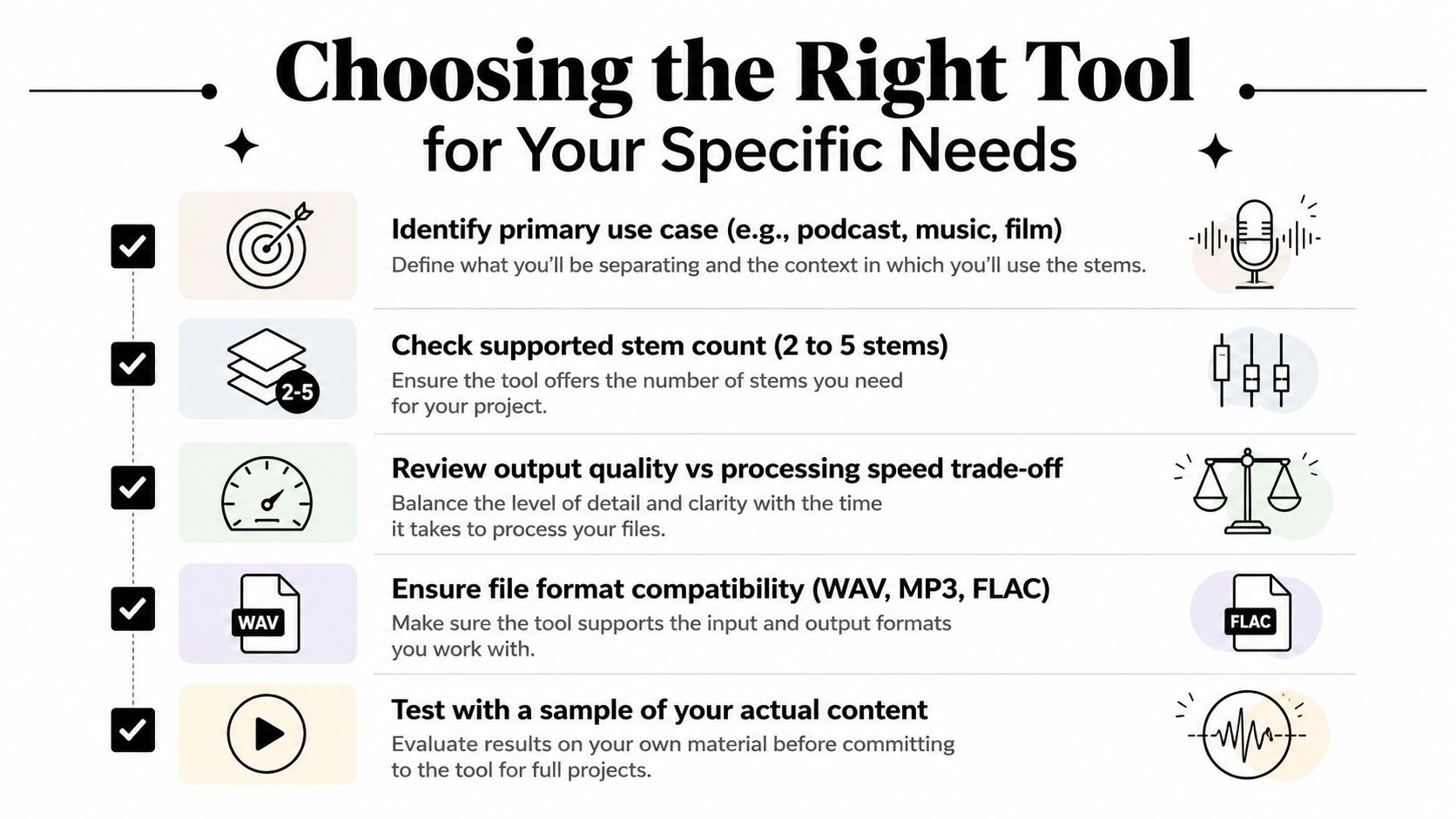
Match the model to the work
For music remixing, prioritize vocal, drum, bass, and instrument separation, plus transient preservation. Desktop tools such as Ultimate Vocal Remover can provide local model choice and control, while integrated music platforms can be easier for quick practice and arrangement work.
For speech cleanup, choose a system that explicitly supports dialogue, speech, noise, and room sound. Music labels such as “vocal” and “accompaniment” don't necessarily map to spoken-word editing. ClearAudio, for example, lets users specify what to keep, including speaker, vocals, music, speech, dialogue, or background music, and offers browser-based processing with quality modes ranging from quick processing to higher-quality options.
For cinematic audio, confirm that the tool understands dialogue, music, and effects as separate editorial targets. A model that only returns music stems may force effects and ambience into an unusable remainder.
A practical selection filter
Run a short, representative test before adopting any service. Use one clean example and one difficult example from your real library, then compare the output in solo and in context.
- Content fit: Does the tool name your actual target, such as dialogue, lead vocal, drums, or effects?
- Stem structure: Can it produce the number and grouping of stems your edit requires?
- Control: Can you select models, quality modes, or target behavior?
- File handling: Does it accept and export the formats your DAW or video editor uses?
- Privacy and scale: Do cloud uploads, local processing, batch work, or team access affect the decision?
A command-line workflow may suit an engineer who wants repeatable local processing. A browser application may suit a producer who needs immediate access without installing models. Teams generating supporting assets can also pair cleaned or separated audio with AI-powered content generators for creators, provided the original rights and the final editorial requirements remain clear.
The right extractor is the one that fails predictably on your material and gives you enough control to recover from those failures.
Getting Better Results From Any Stem Extractor
Input preparation starts before the upload. Export the cleanest source available, avoid unnecessary transcoding, and keep the original file untouched so you can return to it when a pass sounds worse. Sample rate, bit depth, channel layout, and file format affect what the model receives, but a higher technical specification can't restore information already removed by a poor recording or compressed copy.
Don't over-process the source before separation. Aggressive noise gating can chop quiet syllables, heavy normalization can exaggerate room tone, and bandwidth limiting can remove cues the model uses to identify a source. Make a safety copy, then compare a minimally prepared version with a gently cleaned version.
Prepare for the source, not the software
A dry spoken recording needs different treatment from a reverberant concert mix. Dense orchestral material needs patience and realistic expectations. Before processing, identify the dominant problem:
- Dialogue overlap: Try a speech or dialogue target rather than a music vocal target.
- Room noise: Preserve the voice first, then apply noise reduction to the separated result.
- Heavy reverb: Expect ambience to remain attached to the voice and plan manual cleanup.
- Dense music: Test shorter excerpts with exposed vocals, drums, and full arrangement sections.
- Low-quality source: Compare the separated stem against the original before deciding whether the artifact is acceptable.
Validate every output
Listen to each stem in solo, then return it to the original mix. Solo listening reveals metallic tails, phase instability, spectral holes, and unnatural edits. Context listening tells you whether those defects interfere with the intended use.
Check transients at normal monitoring level. Drums may lose attack, bass may develop tonal wobble, and vocals may acquire watery high frequencies. Also check the stereo image, because an output that sounds acceptable in headphones may become unstable when collapsed or summed with other material.
If the first pass fails, change one variable at a time. Try another model, a different target grouping, or a less processed input. Multiple passes can help, but combining outputs blindly can create phase problems and compound artifacts.
Treat AI as the first edit
The most dependable workflow uses the extractor as a starting point. Clean obvious residue with clip gain, fades, spectral repair, or carefully tuned denoising in a DAW. Keep the original mix available, automate between the stem and the source when a phrase becomes unstable, and replace irreparable moments with alternate audio where possible.
A separated stem doesn't need to sound perfect in isolation if it supports the finished edit. It does need to behave predictably in context, survive the next processing stage, and remain honest about what the source can provide.
ClearAudio is designed for browser-based audio cleanup and separation, including dialogue, speech, vocals, music, and background elements, with selectable processing modes for faster previews or more detailed results. If your workflow involves interviews, video dialogue, or mixed recordings that need a practical first pass, visit ClearAudio and test it with a representative file.