You record a great take. The wording lands, the pacing feels natural, and the emotion is right. Then you play it back and hear the air conditioner, a hard room bounce, laptop fan noise, traffic through the window, or music bleeding into the mic from the next room.
That's the moment most creators realize audio problems aren't just technical problems. They become editing delays, retakes, awkward compromises, and in the worst cases, content you cannot use. For podcasters, video editors, journalists, and musicians, speech enhancement methods sit right at that painful intersection between theory and workflow. You don't just want cleaner sound. You want speech that still sounds like a person, not a machine that survived a wash cycle.
The good news is that this field has matured. What started as classic digital filtering has grown into a much broader toolkit that includes dereverberation, beamforming, deep neural networks, and generative models. The tricky part isn't finding a method. It's knowing which method matches the mess in front of you.
Table of Contents
- Why Crystal-Clear Audio Is No Longer an Option
- The Foundation Classic Digital Signal Processing Methods
- Beyond Noise Reduction Dereverberation and Beamforming
- The Deep Learning Revolution Modern AI Approaches
- How to Choose the Right Enhancement Method for Your Project
- Common Pitfalls and Real-World Tradeoffs
- Putting It All Together with Simple AI Audio Tools
Why Crystal-Clear Audio Is No Longer an Option
If you make spoken content today, clean dialogue isn't a finishing touch. It's part of the core product.
A podcast listener will forgive a simple visual setup. A YouTube viewer will tolerate a modest camera. But when speech is muddy, masked by hiss, or smeared by echo, people have to work to understand you. That effort breaks attention fast. Even strong ideas lose force when the delivery feels tiring.
For creators, the frustrating part is how normal these problems are. You can use a decent microphone and still get a bad result because the room is reflective. You can record an excellent interview and discover low electrical hum afterward. You can capture usable dialogue on location, only to find that a bus pass, HVAC rumble, or nearby music sits right under the voice.
Clean speech doesn't just sound better. It lets the listener stop thinking about the audio and focus on the meaning.
Different kinds of work carry different stakes. A podcaster wants long-form listening comfort. A documentary editor needs intelligibility from difficult field recordings. A musician may want to isolate a vocal without stripping out the singer's tone. A teacher or journalist may care less about polish and more about making every word understandable.
That's why speech enhancement methods matter. They're not one magic button. They're a family of approaches built for different failures in the signal.
How creators usually experience the problem
- The podcaster's version: The voice is good, but the room sounds boxy and the laptop fan never stops.
- The editor's version: Dialogue is buried under location noise, and ADR isn't possible.
- The musician's version: You need to pull vocal detail from a mixed or noisy recording without tearing up the timbre.
- The remote team's version: Calls are understandable, but not clean enough for publishing, training, or transcription.
The rest of the challenge is choosing the right kind of help. Some methods remove steady background noise. Some deal with room reflections. Some use multiple microphones to focus directionally. And newer AI systems learn patterns that older filters could never model well.
The Foundation Classic Digital Signal Processing Methods
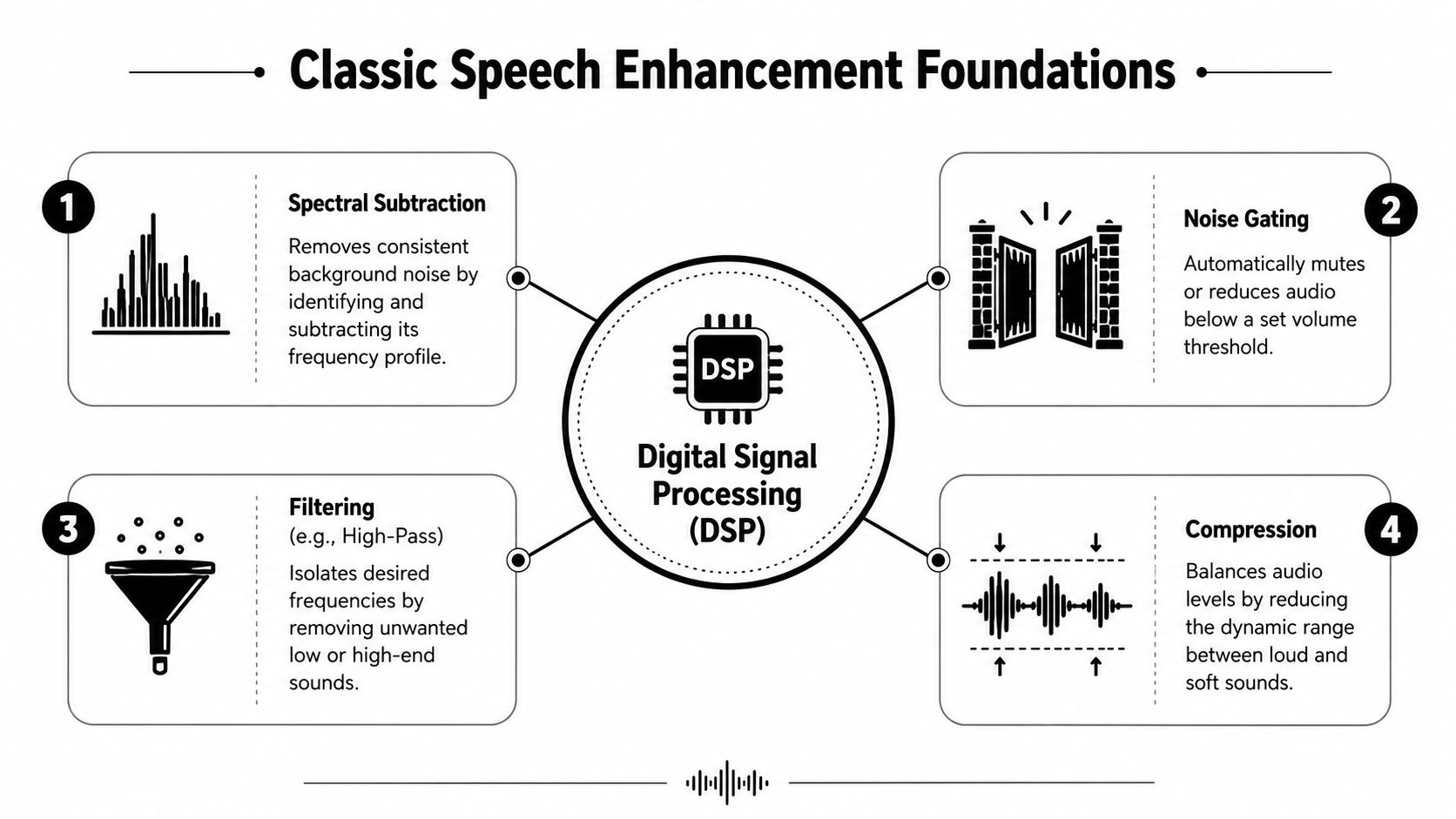
Classic speech enhancement started with digital signal processing, or DSP. These are the methods audio engineers used long before current AI models arrived, and they still form the mental model behind many modern cleanup tools. If you know what these filters are trying to do, it becomes much easier to predict why one tool removes a fan cleanly, while another leaves the voice thin, phasey, or full of watery artifacts.
At the core, classic DSP treats speech cleanup as a sorting problem. The algorithm looks at very short slices of audio, converts them into frequency bands, and asks: which parts behave like speech, and which parts behave like interference?
How classic filters think about sound
A waveform shows audio as one moving line over time. Classic enhancement methods often switch to the frequency domain, where that line is broken into tiny time windows and separated into bands. It is a little like looking at a chord on a piano and asking which notes belong to the singer and which belong to the air conditioner.
Spectral subtraction is the clearest example. The system estimates the noise profile, often from a moment of room tone, then subtracts that profile from the rest of the signal. If the background noise is steady, such as HVAC rumble, tape hiss, or computer fan noise, this can work well enough to make speech noticeably clearer.
The catch is simple. Speech and noise often occupy some of the same frequencies. If the subtraction is too aggressive, the filter cuts into the voice along with the noise. That is why an overprocessed recording can sound hollow or metallic.
Wiener filtering takes a more graduated approach. Instead of subtracting a fixed noise print, it continuously adjusts how much each time frequency region should be reduced based on the estimated signal-to-noise ratio. Regions that appear speech-dominant are preserved more carefully. Regions that look noise-dominant are reduced more heavily.
MMSE estimation, short for minimum mean-square error estimation, pushes further into probability. Instead of removing what looks unwanted, it estimates the clean speech signal most likely to have produced the noisy recording. That sounds abstract, but the practical takeaway is straightforward: MMSE methods try to reconstruct a believable voice, not just carve away interference.
Why old-school DSP still earns a place
Classic DSP remains useful for a lot of real work. It is lightweight, fast, and predictable when the problem is simple.
- Steady background noise: fan hum, broadband hiss, air conditioning, and other sounds that do not change much over time
- Low-latency chains: live monitoring, conferencing, hearing devices, and embedded systems where delay matters
- Manual control: DAW workflows where an editor wants to tune thresholds, reduction amounts, or noise prints with intention
This is also the point where theory becomes a practical choice. If you are cleaning a podcast recorded next to a laptop fan, a traditional noise reduction module may be all you need. If you are restoring dialogue with traffic swells, clinking dishes, and background chatter, classic filtering often reaches its limit fast. Tools such as ClearAudio package these decisions in a simpler interface, but under the hood the same question still applies: is the noise steady and predictable, or complex and constantly changing?
The most common failure mode is musical noise. Instead of hearing the original background, you hear synthetic chirps, watery swirls, or glittery little bursts. The filter has reduced the noise unevenly across time and frequency, and the leftovers form a new texture that was never in the recording.
Practical rule: If the cleanup adds a strange texture of its own, the tool is probably removing more than it understands.
Classic filters also struggle with non-stationary noise. A passing truck, keyboard clicks, nearby voices, or music leaking from another room changes too quickly for fixed assumptions to track well. That limitation is one reason modern creator tools increasingly combine DSP foundations with learned models. The older methods teach the rules. Newer systems are better at handling the messier situations real recordings tend to have.
Beyond Noise Reduction Dereverberation and Beamforming
A creator records a strong take in a kitchen, opens the file, and hears a voice that sounds ten feet away. Another joins a video call from a conference room and every sentence seems to bounce off the walls before it reaches anyone else. In both cases, the problem is less about hiss and more about acoustics.
Rooms leave fingerprints on speech. Hard surfaces send copies of the voice back to the microphone a fraction of a second late, and those copies blur detail. The result is a washed-out sound where words are audible but less intelligible.
Dereverberation targets the room, not just the noise
Dereverberation reduces the effect of those reflections.
The simplest way to hear the problem is to focus on consonants. Sounds like t, k, p, and s carry much of speech clarity. In a reflective room, the direct voice arrives first, then a trail of delayed reflections fills in behind it. It works like dragging a paintbrush through fresh lettering. The word is still there, but its edges lose definition.
That is why dereverberation is a different job from denoising. Noise reduction tries to suppress unwanted energy mixed into the signal. Dereverberation tries to separate the voice from the room that wrapped around it.
Under the hood, some methods estimate how the room is smearing the signal and reduce that smear. Others look for patterns that distinguish the direct path from the reverberant tail. For a creator, the practical question is simpler: does the recording sound unclear because of background noise, or because the space itself is clouding the voice?
That distinction matters when you choose a tool. If your audio sounds boxy, distant, or hollow, pushing a denoiser harder often makes the result smaller and stranger without fixing the underlying cause. A tool designed for room problems, including newer creator-facing options such as ClearAudio, is more likely to improve presence because it is solving the right problem first.
Beamforming uses microphone placement to favor the right sound
Beamforming comes into play when you have more than one microphone.
Instead of cleaning a single track after the fact, beamforming compares tiny timing and level differences across multiple mics to estimate where sound is coming from. The system can then give more weight to audio arriving from the target direction and less weight to sound arriving from elsewhere.
Human hearing works in a similar way. Two ears give the brain directional clues, which is one reason a person can follow one speaker in a crowded room better than a single microphone can. A microphone array uses that same basic idea in an engineered form.
This method shows up in conference bars, smart speakers, phones, laptops, hearing devices, and multi-mic production rigs. If the talker is in front of the array and the distractions are off to the side, beamforming can improve intelligibility before any later cleanup starts.
That makes beamforming a practical choice, not just an academic one. A solo podcaster with one USB mic cannot use it. A team recording roundtables with multiple capsules can. A laptop user on calls may already be relying on it without realizing it, because the device is steering its pickup pattern in software.
Many modern tools combine these ideas. Spatial processing can narrow attention toward the speaker, then later stages can clean up what remains. For real workflows, that is often the most useful way to think about method selection:
A denoiser asks, “What should be removed?”
A dereverberation system asks, “What did the room smear?”
A beamformer asks, “Which direction should I trust?”
Choose the method that matches the failure.
If speech sounds buried in the room, address reverberation. If the setup includes multiple mics and the speaker position is reasonably clear, use direction to your advantage. That is how the theory maps to a real decision inside a production chain or a one-click tool.
The Deep Learning Revolution Modern AI Approaches
A creator cleans up a voice track recorded in a kitchen. The refrigerator hum is easy enough. Then a chair scrape crosses the sentence, traffic washes through the window, and the voice loses clarity only on certain words. Classic DSP can help with pieces of that problem. Learned models changed the field because they can treat the recording less like a fixed noise-removal puzzle and more like a recognition task.
Instead of writing rules such as “subtract this frequency region” or “assume the noise stays steady,” engineers train models on large sets of paired examples: clean speech, noisy speech, reverberant speech, overlapping speech. After enough exposure, the model builds an internal sense of what speech structure usually looks like. It is closer to teaching an assistant by playing thousands of before-and-after restorations than by handing over a page of equations and hoping every future recording behaves the same way.
What changed when models started learning
The practical difference shows up in messy audio.
A neural network can learn patterns that older methods struggle to describe cleanly. Keyboard clicks are brief. Cafe noise rises and falls. Music bleed can sit in the same frequency range as the voice. A fixed statistical model often needs tidy assumptions to separate those elements. A learned model can use shape, timing, and context together.
That is why modern speech enhancement papers often frame the task as estimation or separation from complex mixtures rather than simple filtering. Some models predict a cleaner spectrogram. Others estimate a mask, which works like a smart stencil placed over time and frequency regions the system believes belong to speech. Some operate directly on the waveform, which means they work on the raw audio signal itself instead of an image-like representation.
Here's a visual way to organize the subject matter.
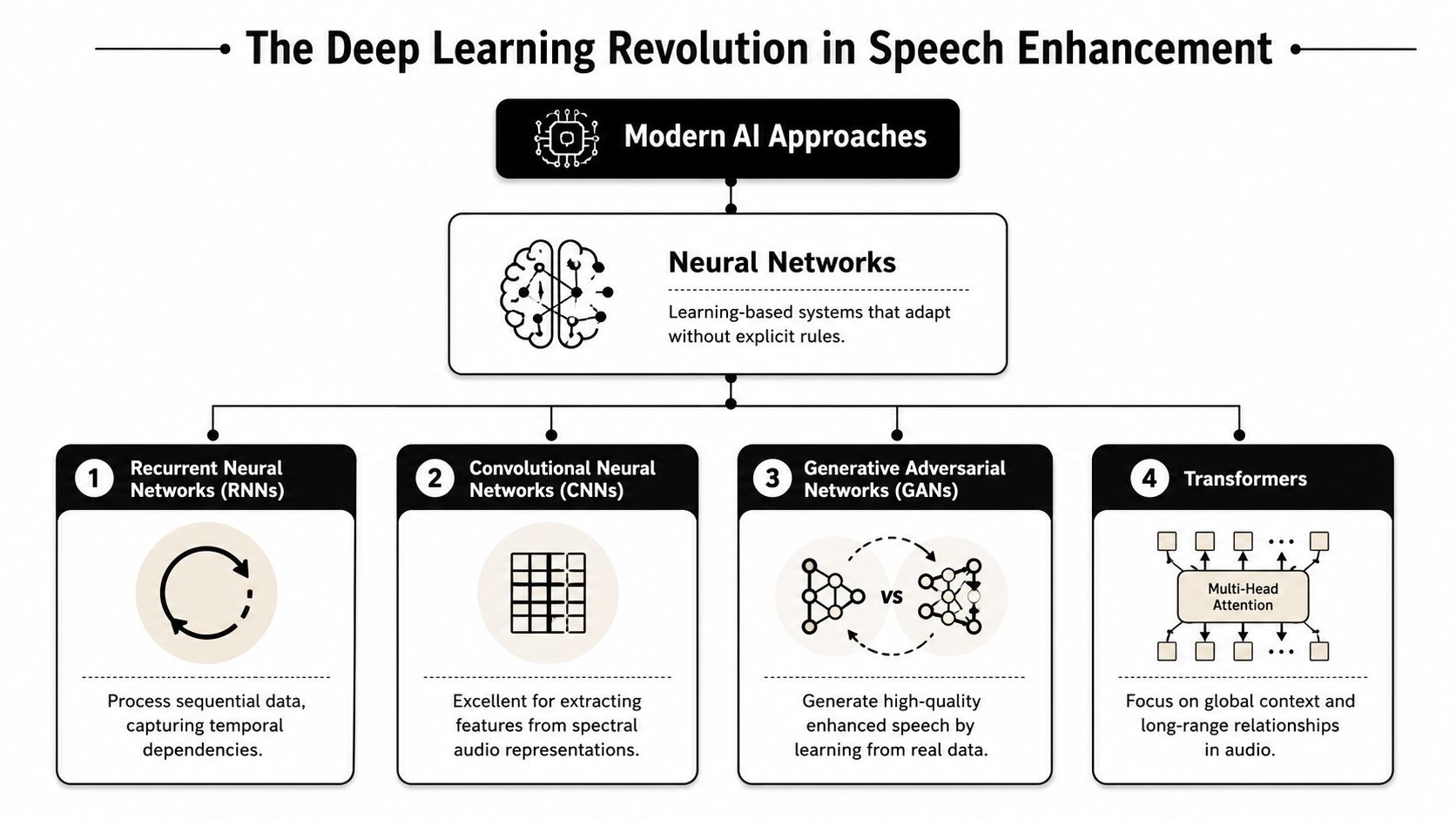
RNNs follow sequence well. They are useful when the system needs to track how speech evolves from one moment to the next, almost like following a melody line through interference.
CNNs work well on spectrograms because they are good at spotting local patterns. Harmonics, consonant bursts, and repeating noise textures often appear as visual structures in that time-frequency map.
Transformers are built for context over longer spans. If one syllable is ambiguous on its own, surrounding speech can help the model preserve the word more naturally.
A widely used design is U-Net. It works like an editor who first zooms out to understand the whole scene, then zooms back in to restore detail. The encoder compresses the signal into a compact representation. The decoder reconstructs it, while skip connections pass fine detail from earlier layers so speech does not come back sounding hollow or over-smoothed. That architecture is one reason many current enhancers preserve intelligibility better than older one-pass filters, especially in single-microphone recordings.
For a quick visual explainer, this video gives useful background:
Why modern models sound more natural
Older systems often remove noise by applying the same kind of logic everywhere in the signal. The result can be clean enough for a transcript while still sounding thin, watery, or smeared to human ears.
Many newer models are trained with perceptual quality in mind, not only numerical error. In plain terms, they are rewarded for producing speech that sounds believable, not just speech that matches a target average. That matters because averaging uncertain possibilities can blur consonants and flatten the natural texture of a voice.
GANs, or generative adversarial networks, pushed that idea further. One network generates cleaned speech. Another judges whether the result resembles real clean speech. That pressure helps the system restore detail in a way that often feels less synthetic than direct regression alone. In creator terms, it is the difference between removing noise on paper and getting audio that still feels like a person in a room.
This shift matters outside research labs. Tools people use, including products such as ClearAudio, increasingly wrap these model families inside interfaces that hide the architecture names. The user sees choices like speech focus, background suppression, or voice isolation. Under the hood, the tool may be combining learned masking, waveform restoration, and quality-aware training objectives.
That is the key practical takeaway. You do not need to memorize every neural network family to make a smart choice. You need to know what modern AI is good at: mixed and changing noise, partial overlap between speech and interference, and cleanup that aims to preserve a natural voice. If your recordings break classic rules, this is often the method class that gives you the best starting point.
How to Choose the Right Enhancement Method for Your Project
The best method depends less on the algorithm name and more on the failure in the audio. However, a common starting point involves asking, “Should I use AI or a filter?” The better question is, “What exactly is ruining this recording?”
Start with the actual problem
If your issue is a steady background layer, like hum or fan noise, classic DSP may be enough. If the speech is blurred by room reflections, look for dereverberation. If you have multiple microphones and competing sound sources, beamforming enters the picture. If the problem is mixed, changing, or hard to describe, modern AI systems usually make more sense because they can model more complex relationships.
Your desired outcome matters too.
A transcription workflow may prioritize intelligibility. A voiceover artist may care more about natural tone. A filmmaker may need to preserve performance nuance while isolating speech from environmental chaos. A musician working on stems may need separation without destroying vocal character.
That last use case deserves extra caution. Isolating dialogue or vocals from mixed content is not the same job as removing steady noise. You're asking the system to separate overlapping sources that may share timing and frequency content.
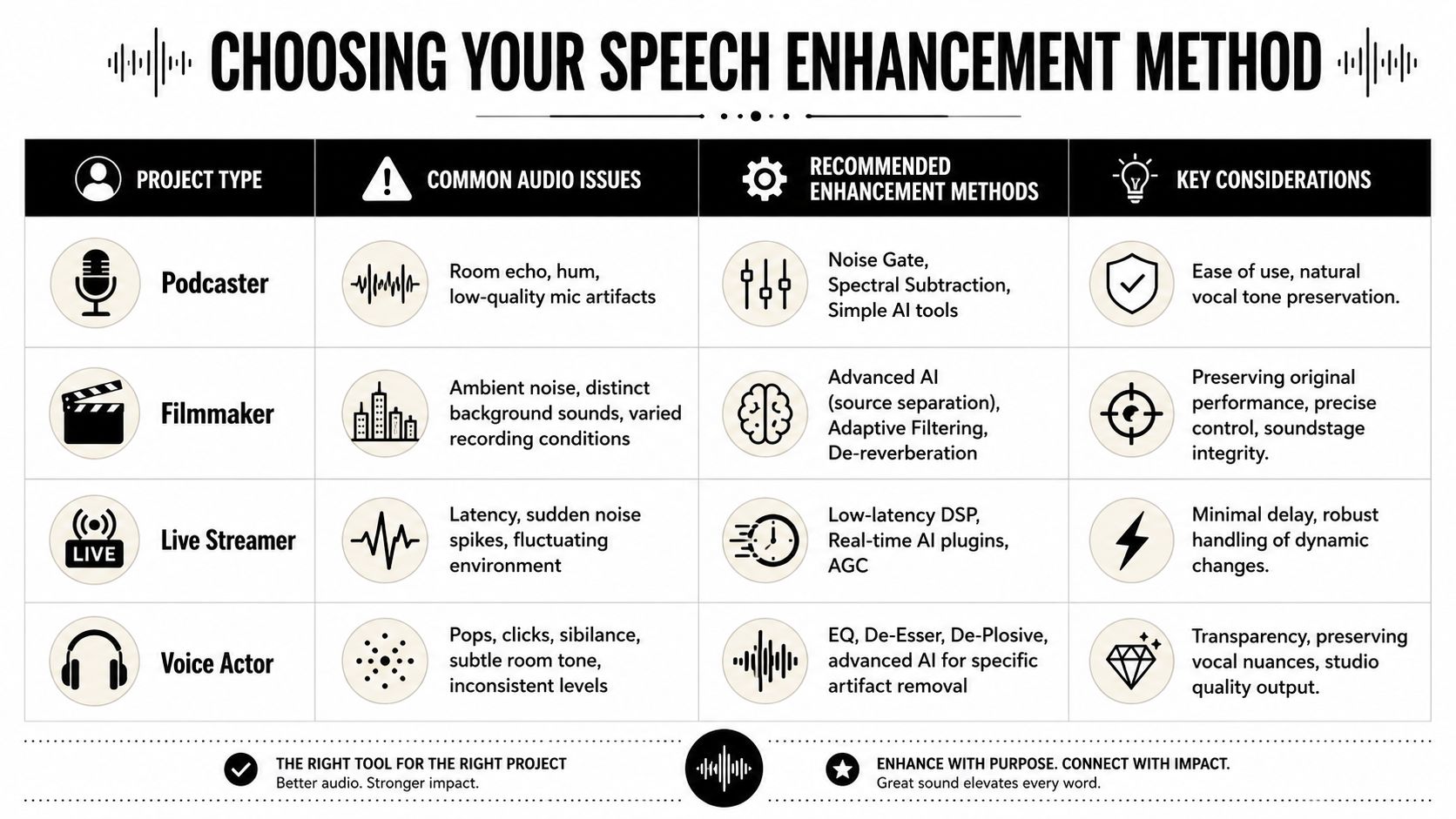
Speech Enhancement Method Selector
| Use Case | Primary Challenge | Recommended Method Type | Key Consideration |
|---|---|---|---|
| Podcast editing | Hum, hiss, mild room tone | Classic DSP or simple AI cleanup | Keep the voice natural and avoid over-thinning |
| Film dialogue | Variable location noise, reflections, off-axis distractions | AI enhancement, dereverberation, source separation | Preserve performance and spatial realism |
| Live streaming | Fast-changing background sounds with low latency needs | Lightweight DSP or low-latency AI | Delay matters as much as cleanup quality |
| Interview restoration | Mixed field noise and inconsistent mic distance | Adaptive AI tools | Expect tradeoffs between clarity and artifact control |
| Vocal or dialogue isolation from music | Overlapping sources in the same spectrum | Source separation or advanced AI models | Natural timbre is harder to preserve |
A simple decision process helps:
- One voice, steady noise: Start with spectral cleanup, filtering, or a basic AI denoiser.
- One voice, bad room: Prioritize dereverberation before aggressive denoising.
- Several voices or directional chaos: Use multi-mic methods or source separation if available.
- Speech against music or dense ambience: Expect to need stronger AI separation and more listening checks.
- High-stakes publishable dialogue: Process conservatively and compare against the original often.
The right tool is the one that solves the main defect while damaging the voice the least.
That's the practical heart of speech enhancement methods. You're not rewarding the most advanced algorithm. You're protecting the spoken performance.
Common Pitfalls and Real-World Tradeoffs
You clean a noisy voice track, hit play, and the background is finally under control. Then the sentence keeps going. The speaker starts to sound papery, the consonants turn brittle, and the room disappears so completely that the voice feels cut out with scissors. That is the tradeoff in one listen. Less noise does not automatically mean better speech.
More reduction can make speech worse
Speech is not just words. It is also micro-details. Breath, transient consonants, low-level harmonics, and small room reflections help a voice feel present and believable. Heavy suppression can shave off those details along with the noise, which is why a cleaner waveform can still sound less natural.
Spectral subtraction is a good example. It works a bit like trying to erase a stain from a photograph by removing every pixel that looks similar to the stain. If your estimate is too broad, you erase parts of the subject too. In audio, that often produces musical noise, those random chirps and sparkles that sound synthetic even when the speech is technically easier to hear.
That problem is not limited to older DSP methods. Some research on modern systems still evaluates success through automatic speech recognition outcomes rather than what human listeners prefer, as noted in this SAGE abstract on speech enhancement and source separation quality concerns. For creators, that distinction matters. A track that transcribes well can still sound tiring, flat, or oddly processed.
Mixed-content audio makes the compromise even harder. Dialogue over music, crowd noise, or street ambience forces the model to guess which parts belong to the voice and which parts belong to everything else. If it guesses aggressively, the result can sound dry and carved out. If it plays safe, bits of the background linger like a watery haze.
Speed, quality, and control rarely peak at the same time
A live tool and a restoration tool solve different problems.
In a call, livestream, or remote session, processing has to happen almost immediately. The system cannot inspect the next few seconds and revise its decision, so developers often use lighter models, lower latency settings, or simpler suppression strategies. In post, the software has more time and more context. That usually leads to better quality, but it also means more rendering time and more chances to over-process.
Control adds another layer. Automatic tools are attractive because they reduce setup and get you to a usable result quickly. Manual or semi-manual tools give an experienced editor more precision, especially on difficult material, but they also ask for judgment. You have to decide whether a slight hiss is less distracting than a lifeless voice, whether room tone should stay, and whether intelligibility or realism matters more for that project.
Practical workflow matters as much as theory. A creator choosing between a classic plugin chain and a modern tool like ClearAudio is not choosing between "old" and "new." They are choosing how much time they can spend, how reversible the process needs to be, and how much artifact risk they can tolerate before delivery.
Watch for these warning signs while processing:
- Swirling or chirping textures: The suppression is creating artifact patterns instead of removing noise cleanly.
- Hollow mids: The chest and body of the voice are getting removed with the noise profile.
- Sharp but unnatural consonants: Intelligibility improved, but the speech no longer sounds believable.
- Over-isolated vocals: Separation worked on paper, yet the result feels detached from the original performance.
If the cleaned file sounds impressive for a moment but distracting over a full sentence, pull the processing back.
A reliable habit is to compare against the original often and across complete phrases, not just the worst half-second of noise. Good enhancement supports the performance from start to finish. It should help the listener forget the cleanup happened at all.
Putting It All Together with Simple AI Audio Tools
You have a voice memo that needs to become a publishable clip in the next ten minutes. The recording has air conditioner rumble, a little room echo, and a passing truck right under the key sentence. At that moment, very few creators want to decide between spectral subtraction, beamforming, or a neural denoiser. They want a clean result they can trust.
That is what simple AI audio tools are for. They package years of signal processing research into controls that match real editing decisions.
Why abstraction helps
A good enhancement tool translates engineering choices into creative intent. Instead of asking for a model type or a chain of processors, it asks what should remain in the frame. Speech only. Dialogue with some room tone. Vocals separated from accompaniment. Less noise, but keep the voice natural.
That shift matters because the underlying methods often overlap anyway. One tool may combine classic filtering, speech separation, dereverberation, and a learned model behind a single preset. To the user, the useful question is not "Which architecture is running?" It is "Does this preserve the performance I need?"
You can compare it to shooting in auto mode with a camera that still uses advanced exposure and color science under the hood. The automation does not remove the science. It puts the science behind a goal you can judge with your ears.
What a modern workflow actually looks like
In practice, the workflow is usually short. Upload the file. Tell the tool what you want to keep or remove. Choose a quality setting. Preview the result. Export the version that fits the project.
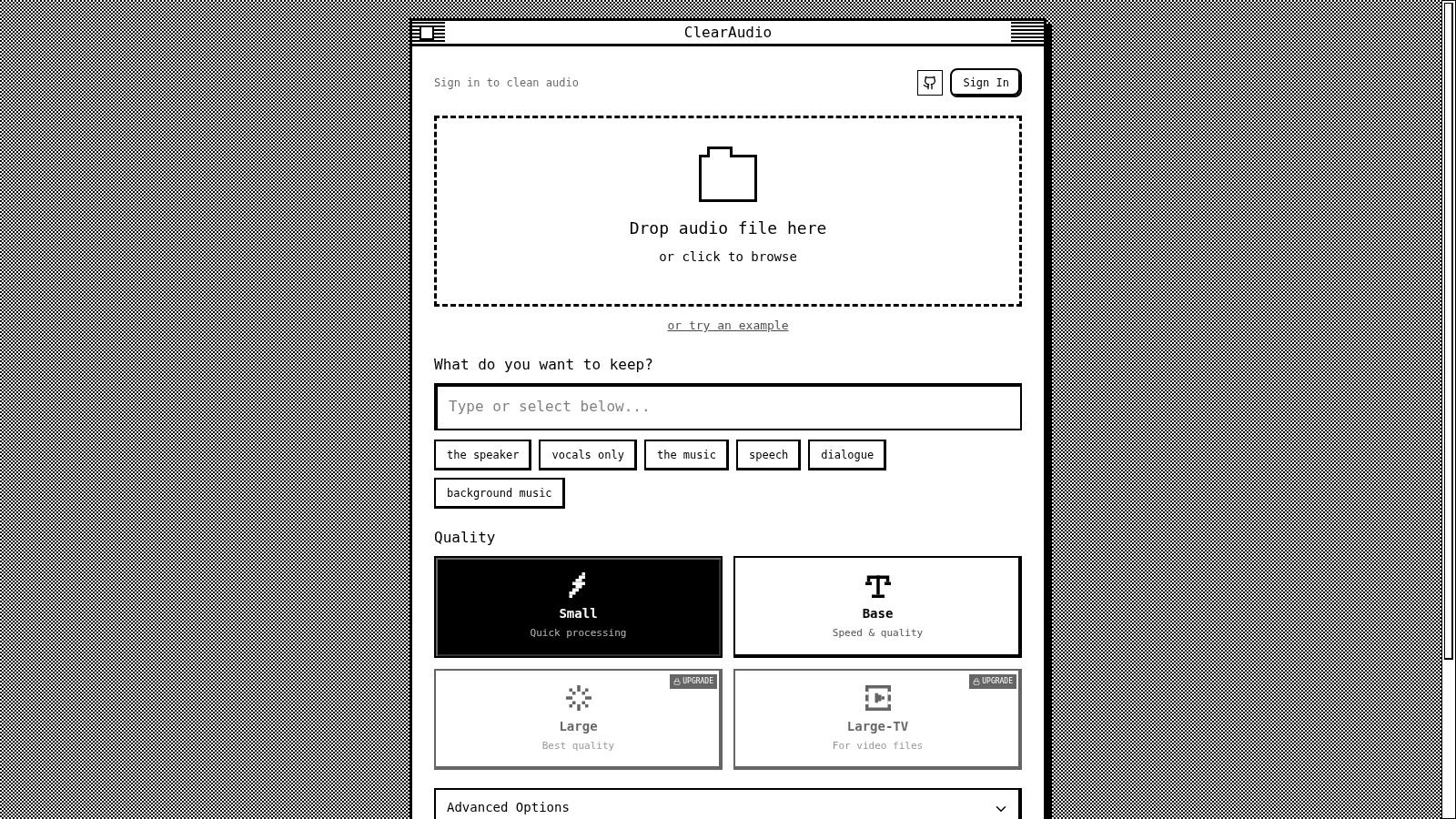
That is very different from building a manual plugin chain and adjusting each stage one by one. It also changes who can get useful results. A solo creator can clean a rough recording without learning studio terminology first. An experienced editor can use the output as a strong first pass, then fine-tune only the sections that still need attention. A production team can apply the same cleanup logic across dozens of files instead of reinventing the process on every episode.
Tools like ClearAudio are useful because they bridge the gap between the language of research papers and the language of production. Academic work describes methods. A creator needs decisions: remove hum, isolate dialogue, reduce crowd noise, keep speech intelligible, finish before deadline. Good AI tools turn those decisions into a fast, repeatable workflow.
The advantage is not that the math disappears. It is that the math is organized around the outcome you care about.