You've got a song, an interview, or a rough video edit sitting on your desktop. The problem isn't that the audio is bad. It's that everything is glued together. The vocal you want to remove is living inside the same file as the drums, bass, keys, room tone, crowd noise, or background music.
That used to mean compromise. You'd reach for EQ, phase tricks, or old center-channel hacks and hope the voice disappeared without taking the snare and half the piano with it. Sometimes it worked well enough for a rough demo. Most of the time, it didn't.
A modern vocal remover AI changes that. It can pull apart mixed audio in ways that were hard to imagine a few years ago. But the real story isn't just that it can remove vocals. The real story is whether the result still sounds musical enough to use. That's where most tutorials stop too early, and where most creators get frustrated.
Table of Contents
- What Is a Vocal Remover AI
- How Modern AI Vocal Separation Actually Works
- Practical Use Cases Beyond Karaoke
- Best Practices for Production-Ready Stems
- Removing Vocals with ClearAudio Step by Step
- Frequently Asked Questions About AI Vocal Removal
What Is a Vocal Remover AI
A vocal remover AI is software that separates a mixed audio file into parts, usually a vocal stem and a music-only stem. In plain terms, it takes a finished soup and tries to pull the carrots back out without ruining the broth.
That matters because creators rarely receive perfect source material. A podcaster may have a field recording with speech buried under ambient sound. A video editor may need background music without lyrics fighting the dialogue. A producer may want an acapella or backing track from a stereo master instead of a full session export.
Older methods worked like blunt tools. You'd cut frequencies where the voice lived, or cancel content sitting in the middle of a stereo image. The problem was obvious. Vocals share space with guitars, synths, snares, and reverb tails, so you often removed useful music along with the singer.
AI-based separation is different. It doesn't only ask, “What frequencies look like vocals?” It also asks, “What patterns behave like a human voice over time?” That shift is why modern tools can do jobs that used to require lots of cleanup after the fact.
Practical rule: Don't think of vocal removal as a magic erase function. Think of it as stem reconstruction from a mixed file.
The most helpful mindset is this: the tool's job isn't just removing the singer. Your job is judging whether the remaining music still feels solid, balanced, and usable in context. For creative work, that distinction is everything.
How Modern AI Vocal Separation Actually Works
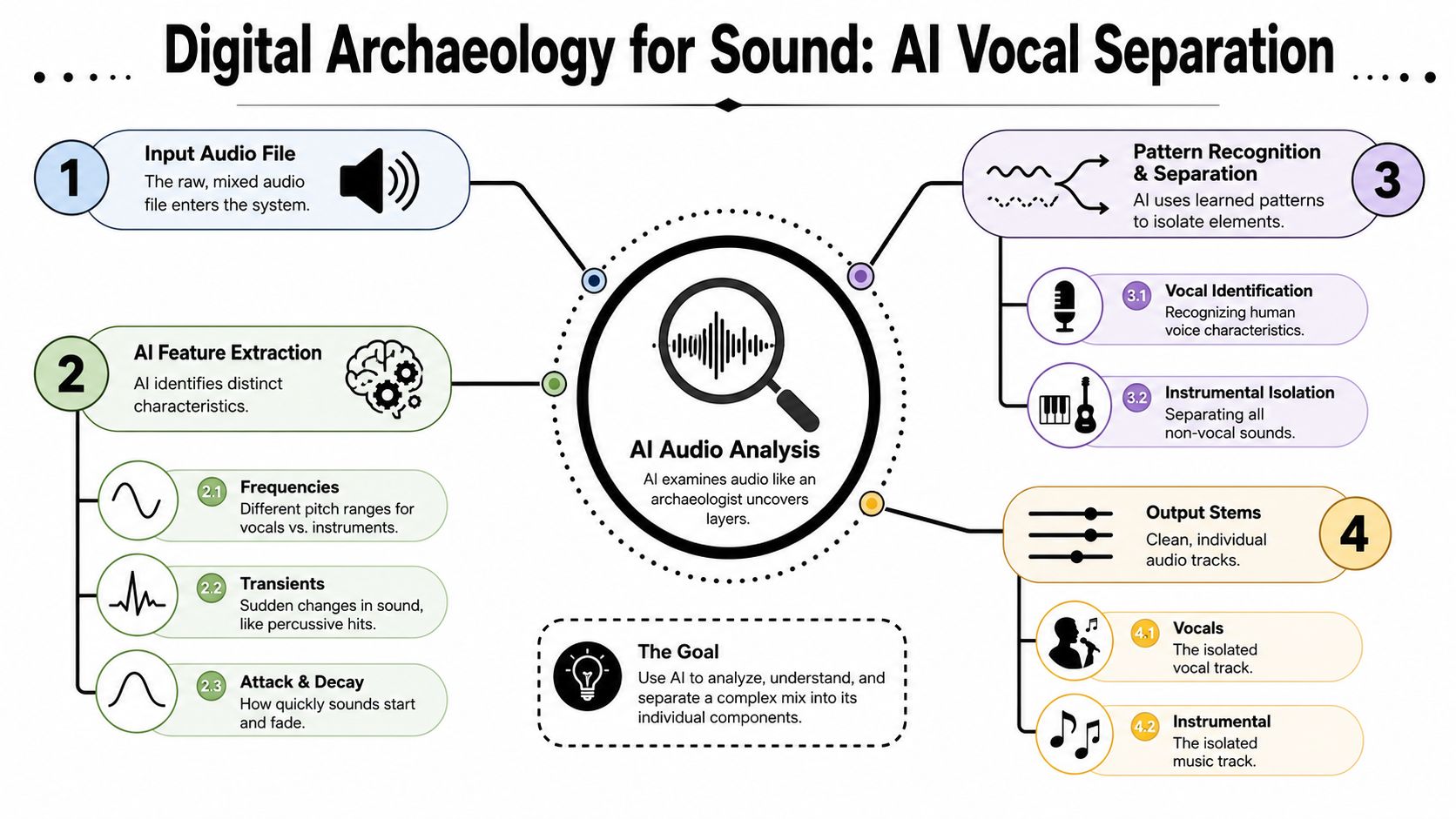
Modern separation software analyzes a finished song in layers, looking for clues that suggest, "this energy belongs to a voice" and "this energy belongs to the instruments." It studies timing, tone, stereo position, and texture at the same time, then rebuilds separate stems from those clues.
It learns patterns across time
Older removal methods mostly chased frequencies. Modern models go further. They look for the behavior of a voice over time, including the way syllables rise and fall, how harmonics stack together, and how vocal energy differs from drums, bass, guitars, and synths even when they share the same frequency range.
One helpful way to picture it is a busy stage under colored lights. Your ears can still follow the singer because the brain uses more than pitch alone. It tracks phrasing, articulation, and movement. AI separation models try to do something similar with audio data.
A common workflow looks like this:
- The song is translated into a visual-style representation of sound over time. One common method is the Short-Time Fourier Transform, which helps the model inspect both frequency content and timing.
- The model scans for vocal traits and other sonic characteristics. It compares patterns that tend to belong to sung words, breath noise, sustained notes, drum hits, and other musical elements.
- It reconstructs new stems from those predictions. The result is an isolated vocal, a backing track, or multiple parts depending on the tool.
A spectrogram helps explain why this is possible. A waveform shows loudness over time. A spectrogram shows where the sound energy lives, from low to high frequencies, as the track unfolds. Voices leave recognizable shapes there, especially when the model has been trained on many examples.
The part that trips people up is reconstruction. The software is not pulling hidden source files out of an MP3 or WAV. It is estimating where boundaries likely are, then rebuilding audio that fits those estimates.
That is why "removed" does not always mean "production-ready."
Why the output can sound clean in one song and messy in another
The hard part is not just finding the vocal. The hard part is removing it without damaging the music around it.
In a simple arrangement, the split can sound impressively clean. In a dense mix, the singer may share space with snare crack, guitar presence, synth harmonics, room reverb, and stereo effects. If those elements overlap, the model has to make judgment calls. Some of the vocal may stay behind. Some of the musical detail may get pulled out with it.
That is where artifacts come from. After separation, you may hear swishy highs, watery reverb tails, phase problems, or the music that feels thinner than the original mix.
A useful analogy is paint restoration. If you remove an old layer too cautiously, residue stays on the surface. If you scrape too aggressively, you damage the artwork underneath. AI vocal separation faces the same tradeoff. Stronger removal can reduce vocal bleed, but it can also shave off cymbal sparkle, synth texture, or the body of a snare.
For creative work, this distinction matters more than the raw separation itself. A technically impressive split is only half the job. The crucial factor is whether the remaining audio still feels musical, balanced, and usable after the voice is gone.
Practical Use Cases Beyond Karaoke
A creator often discovers the value of vocal separation in the middle of a problem, not during a demo. A podcast interview comes back with music bleeding into the room. A video edit needs the same song feel, but without the sung topline. A DJ wants a cleaner loop for a transition that does not fight the next track.
That is the actual use case. Getting audio apart is only helpful if the result still works in a project.
For podcasters and interview editors
Speech editors often receive recordings that were never meant to be separated later. Maybe a guest joined from a cafe, a producer left a music bed under dialogue, or a live stream export flattened everything into one file. In those cases, a vocal remover AI can act like a repair assistant. It tries to pull the spoken voice away from the competing material so you have more control in post.
The goal is not perfection. The goal is a track you can edit, clean, duck under music, or send to transcription without the whole thing falling apart.
For video editors and filmmakers
Editors deal with compromised audio all the time. Archive clips, event footage, social videos, and rushed brand content often arrive as a single mixed file. Separation can help carve out space for narration, alternate music, sound design, or simpler dialogue editing.
A practical example helps here. If a scene has the right pacing because of the original music, replacing the whole track may break the cut. Pulling down or removing the vocal while keeping more of the underlying music lets you preserve timing and mood. That is often more useful than starting from scratch.
For musicians, DJs, and remixers
Music creators use these tools for much more than karaoke prep. A producer may want an acapella to sketch a remix. A DJ may need a cleaner loop for transitions. A songwriter may want to hear the arrangement more clearly, the way a mixer solos a few channels to study what the drums, bass, and harmony are really doing.
The key question is whether the extracted parts still feel musical. A technically separated track can still be rough around the edges, with smeared cymbals, thin synths, or bits of vocal reverb left behind. For remixing and performance, that difference matters. A usable stem supports the groove and survives further processing. A messy one creates more repair work than it saves.
Some creators use tools such as Moises.ai, Vocal Remover Org, or PhonicMind. The bigger point is not which brand appears on screen. It is that separation now sits inside everyday editing and production work, where the standard is not “Did the vocal disappear?” but “Can I build with this result?”
Best Practices for Production-Ready Stems
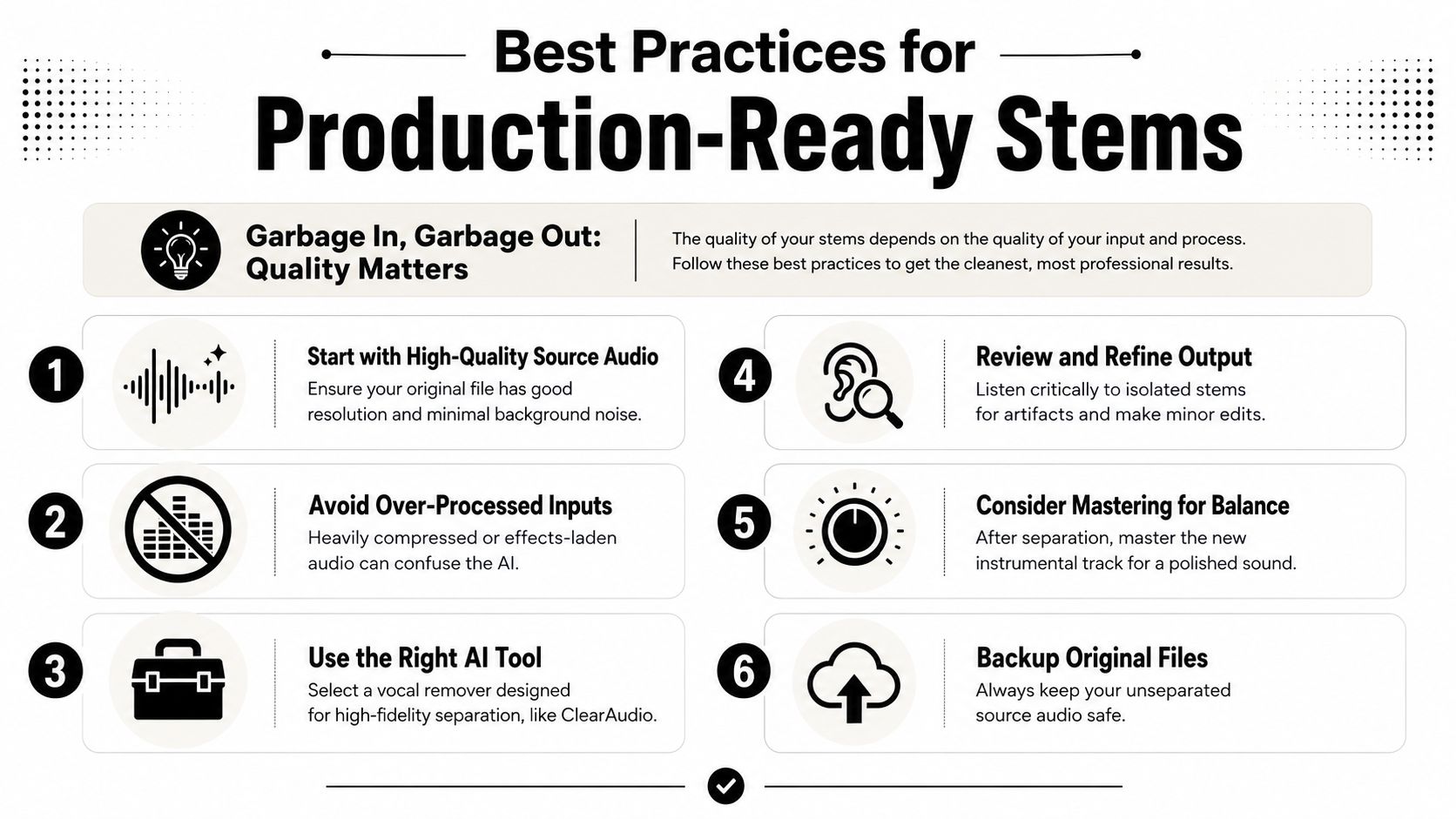
The biggest mistake people make is celebrating the vocal removal before checking the music. A technically successful separation can still be a musically weak result. If the groove collapses, the bass gets hollow, or cymbals turn into fizz, you don't really have a useful stem. You have proof that the algorithm tried.
Start with the source, not the software
Source quality matters more than most users expect. In the UVR workflow guide for vocal removal, lossless formats such as WAV and FLAC are described as mandatory for optimal results, and MP3 artifacts can reduce separation accuracy by 15 to 20 percent.
That tracks with what engineers hear in practice. MP3 encoding throws away information. It also introduces smearing, pre-echo, and masking that confuse the model's pattern recognition. If the file already has damage, the AI has less to work with.
Use this quick check before you process anything:
| Source condition | What usually happens |
|---|---|
| Lossless file with balanced mix | Best chance of clean stems |
| MP3 or heavily compressed file | More artifacting and false separation |
| Already processed audio with strong effects | Harder for the model to identify clean boundaries |
Choose settings for the track, not your ego
The same guide notes that aggressive settings from 12 to 15 can yield 93 to 95 percent isolation, but may introduce artifacts. Gentle settings from 5 to 8 preserve fidelity at 80 to 85 percent accuracy.
That's a tradeoff, not a ladder.
If your goal is a behind-the-scenes practice track, aggressive removal may be fine. If your goal is a release-ready music track, less aggressive processing often sounds better because the drums, bass, and upper harmonics stay more natural.
Mix advice: The best stem is often the one with a little vocal residue but stronger musical integrity.
Listen for musical damage, not just vocal reduction
A lot of users solo the backing track, hear less singing, and call it done. Then they drop the file into a session and wonder why the groove feels flat. The problem is that separation can damage the parts your brain depends on for feel: bass weight, transient snap, stereo width, and ambience.
According to StemSplit's discussion of common tool limitations, standard pop tracks may separate well, but heavily processed vocals or dense arrangements often leave watery artifacts or thin the bass groove. That's the gap most basic tutorials ignore.
Listen in context with a checklist:
- Check the kick and bass first. If the low end pumps oddly or disappears on vocal entries, the stem may not survive a real mix.
- Focus on consonant zones. Snares, guitars, and synth attacks often get chewed up where vocal presence lives.
- Test at low volume. Artifacts often show up more clearly when you're not distracted by loud playback.
- Compare gentle versus aggressive passes. Sometimes a lighter pass plus minor cleanup wins over a harsher one-pass result.
If a stem sounds strange after heavy EQ in the vocal range, don't assume more processing will save it. Sometimes that only exposes the scars.
Removing Vocals with ClearAudio Step by Step
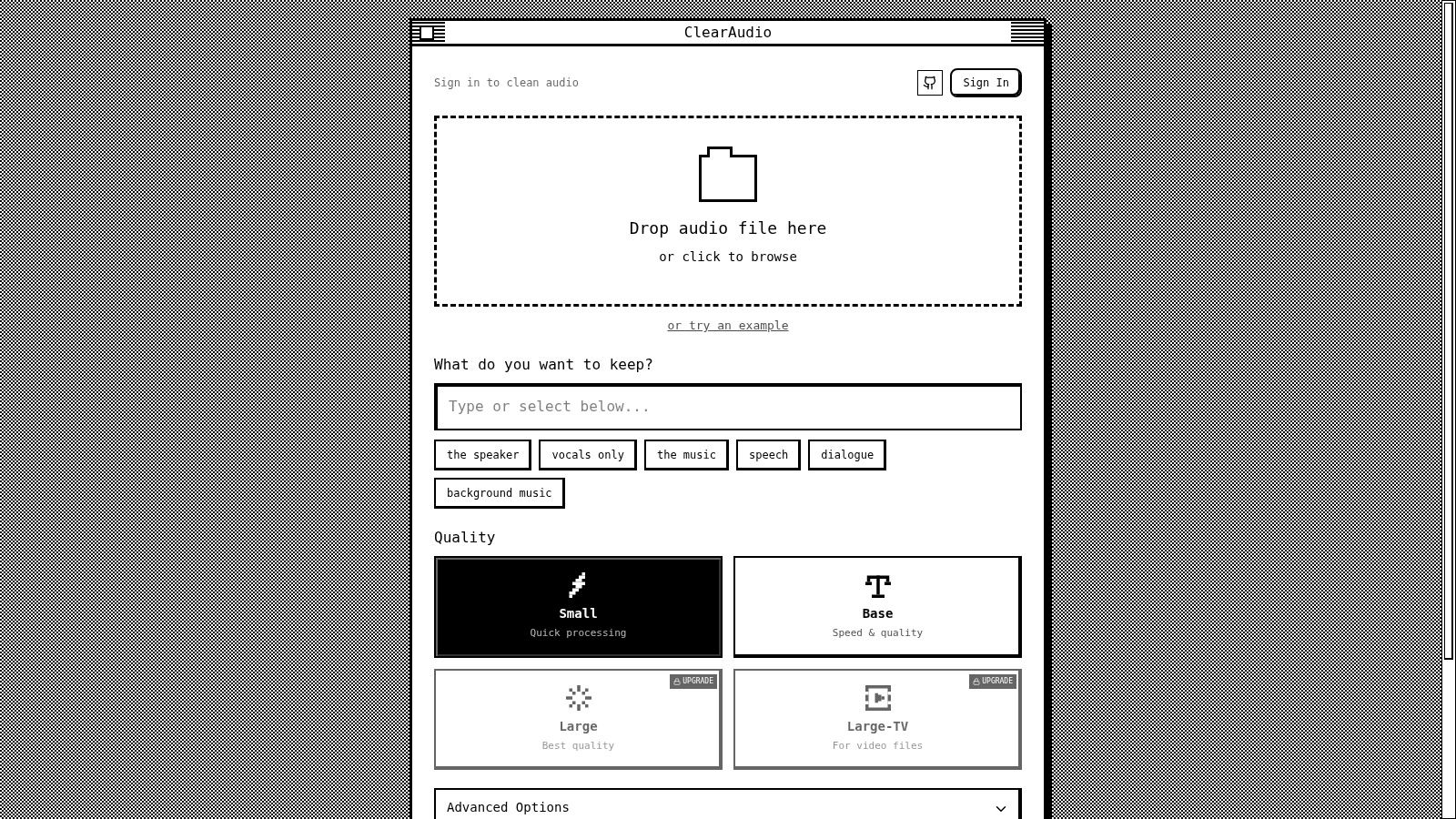
If you want a fast workflow, a browser-based tool lowers the friction. You don't need to install a DAW template, configure a model manager, or babysit exports. You load the file, choose what you want to keep, and process it.
Step 1 upload the file you actually want to use
Start with the highest-quality version you have. If there's a WAV, use that instead of the MP3 download. If you're working from video, use the original export instead of a reposted social clip.
In ClearAudio, you can drag and drop an audio or video file into the app, or browse to upload manually. That matters for editors because many real-world jobs begin with a video asset, not a clean music file.
Before you click process, pause and ask one practical question. Do you need an isolated vocal, the backing track, cleaner dialogue, or just the music bed? Choosing the wrong target can create extra work later.
Step 2 choose the output that fits the job
ClearAudio lets you specify what to keep, including vocals only, music, speech, dialogue, or background music. That sounds simple, but it's a big advantage for people who aren't only doing song remixes.
A musician might choose vocals only to get an acapella for arrangement work. A video editor might choose dialogue. A podcaster might isolate speech while removing background elements from an interview.
Here's the key. Don't process out of habit. Process for the deliverable.
- Remix prep: Choose the stem that gives you the cleanest building block for your session.
- Video post: Prioritize intelligibility over complete separation perfection.
- Archive recovery: Keep the element that matters most, even if the other stem is imperfect.
A short walkthrough helps if you want to see the interface in motion.
Step 3 pick quality before you export
ClearAudio offers multiple quality modes, from quicker settings to PRO Large and PRO Large-TV for higher-end output. If the file is central to your final project, it makes sense to use the stronger mode first instead of trying to rescue a lower-quality export later.
After processing, audition both stems. Don't just listen for whether the vocal is gone. Listen for whether the remaining track still feels balanced. Check the intro, the densest chorus, and any exposed breakdowns. Those are usually the places where artifacts reveal themselves.
A clean-looking waveform doesn't guarantee a clean-sounding stem.
If the first pass isn't musical enough, try a different source file or a different output target before doing extreme post-processing. Small workflow choices at the start often save the session.
Frequently Asked Questions About AI Vocal Removal
Can I use extracted stems in a commercial project
Not automatically. The separation tool can split the audio, but it doesn't grant commercial use rights. As explained in a discussion of AI stem separation and copyright, you still need to determine whether the source is royalty-free or whether a license is required for sampling, remixing, or commercial release.
That's the legal line many users miss. Technology changes access. It doesn't change ownership.
If you plan to release the result publicly, verify the rights before you spend time polishing the stem.
Why does my instrumental still sound watery or hollow
Because the model had to guess where the voice ended and the music began. Dense arrangements make that hard. So do autotune, distortion, stereo widening, reverb-heavy vocals, and masters that are already compressed.
The most common damage shows up in the upper mids, ambience, and low-end solidity. You remove the singer, but you also shave off some snap, body, or width. That's why “vocal gone” and “track usable” are not the same milestone.
A better test is this: does the stem still feel good under a new vocal, narration track, or edit cut?
Are free tools good enough
Sometimes, yes. Sometimes, no. It depends on what “good enough” means for your project.
If you need a scratch stem for rehearsal, idea generation, or a rough social edit, a simple free tool can be fine. If you need predictable output, batch reliability, more control over what gets kept, or better handling of production assets, paid options usually fit better.
There's also a market split worth understanding. According to PMarketResearch's overview of vocal remover distribution and technology, direct-to-consumer online platforms account for about 68 percent of global sales, and the category ranges from creator-focused tools to API-based offerings such as LALAL.ai for embedded workflows. The same overview notes the use of AI with Fast Fourier Transform methods, and highlights applications in restoration, karaoke generation, music production, and podcasting.
That tells you something practical. This isn't one product type. It's a spectrum, from quick web utilities to tools built for integration and scale.
Which tools are people actually using
The names that come up often include PhonicMind, Moises.ai, LALAL.ai, and browser tools aimed at simpler one-off exports. Some products focus on musicians. Others are better for speech, dialogue, or platform integration.
The right choice depends less on hype and more on the job:
- If you need remix material, judge low-end retention and transient clarity.
- If you need dialogue cleanup, judge intelligibility and artifact control.
- If you need repeatable volume processing, judge workflow and file handling.
One more technical note matters for heavier workloads. The same UVR guide cited earlier reports that GPU-enabled processing can reduce inference time by 3 to 5 times, with standard songs often processing in 1 to 3 minutes depending on hardware. That won't matter to everyone, but it matters a lot if you're comparing local versus browser workflows or handling lots of files.
The smartest expectation is modest and professional. AI separation is strong enough to rescue, repurpose, and accelerate a lot of creative work. It still needs your ears.
If you want a simple way to test these ideas on real audio, ClearAudio is a practical place to start. You can upload audio or video, choose exactly what to keep, and process toward vocals, music, speech, dialogue, or background music without building a complicated setup first.